
While WebRTC obviously still has my undivided attention, I’ve been playing more and more with QUIC too, recently. On this very blog, I talked about me getting started with QUIC, my first experiments with RTP Over QUIC (RoQ) and Media Over QUIC (MoQ), and our imquic open source QUIC library, that I introduced at FOSDEM as well just a few months ago. Considering that I firmly believe WebRTC and real-time media on QUIC will co-exist for quite a while, I thought it was time to start sharing some of my efforts in that direction, and specifically about what I’ve done so far in terms of an experimental integration of QUIC features in the Janus WebRTC Server.
This is not strictly speaking “new”: I did share some info on those experiments in both the RoQ and MoQ blog posts, at the time, and I hinted at how imquic had been released as a library also to facilitate and foster those specific integrations. This is the first time you can actually play with those yourselves, though, as this blog post will refer to an existing branch in the Janus repository you can tinker with on your own. More precisely, while the branch has code related to MoQ too, I’ll focus on the RTP Over QUIC integration, here, as that’s a more “linear” integration considering the same protocol is used in both technologies. A follow-up post on MoQ will come soon as well, once I have more data to share (and the MoQ APIs get a bit more stable…).
So, taking well into account that this is experimental code and things may horribly break, let’s brace and get started!
As a side note, I’ll make a hands-on and practical demonstration of all these concepts during a workshop at the upcoming OpenSIPS Summit in Bucharest, so make sure to pass by if you’re interested!
A quick recap: what’s RoQ again?
As the name suggests, RoQ (or RTP Over QUIC) basically specifies how to encapsulate RTP on top of QUIC. In fact, while RTP is pretty much always sent in UDP datagrams (both in the VoIP and the WebRTC world), that’s not an “exclusive” relationship: it’s not at all a widespread approach, but RFC 4571 documents how you can frame RTP packets in TCP streams, for instance (e.g., in deployments where UDP may be blocked and TCP may be the only available way to transport media), not to mention how you can encapsulate RTP on other application protocols, like TURN.
Considering that QUIC is basically a transport layer protocol (even though layered on top of UDP, rather than IP directly), it makes sense to envisage it as a potential transport for RTP as well. This is exactly what the AVTCORE Working Group at the IETF tried to do, in a dedicated draft meant to specify how to make that happen.
Without spending too much time on the nitty-gritty details, the document focuses mostly on two things:
- what is required of the original RTP/RTCP specification, and what is redundant when done via QUIC?
- how can you actually encapsulate RTP/RTCP on QUIC, and what’s needed?
Quite a lot of text is devoted to the former item, especially considering the properties of QUIC as a protocol. In fact, QUIC being an always encrypted transport protocol with support for flow and congestion control means there is, e.g., feedback that is typically carried via RTCP that may be considered redundant, as the same information may be provided by QUIC itself. At the same time, SRTP may be considered redundant as well (QUIC already encrypts data), unless end-to-end encryption is required.
From an implementation perspective, it’s more interesting to go through the encapsulation directives instead, that is what options are available when it comes to multiplexing RTP packets on top of QUIC. The first interesting piece of information the document provides is the concept of “Flow ID”: the document clarifies that multiple RTP streams can be multiplexed on top of the same QUIC connection, and this Flow ID is meant to be an important part of that functionality. In fact, if each packet is tagged with a specific Flow ID that both sender and receiver are aware of, this means that it’s always possible to figure out the context of an incoming RTP packet, even when it’s coming in on the same connection as other concurrent packets. In that sense, the Flow ID provides a different context than, e.g., an SSRC: in fact, while you can definitely map each stream to a separate Flow ID (e.g., by performing a 1-to-1 mapping between SSRCs and Flow IDs), you’re not at all required to do that, as you may want to perform a different kind of mapping instead (e.g., Flow ID 3 may be all of my audio RTP and RTCP packets, or all RTP and RTCP packets contributed by Bob, no matter the type or m-line).
Once we know what a Flow ID is, how can we actually send it along RTP packets on top of QUIC? The document specifies mainly two different ways, with some variants, which directly map to features of QUIC itself:
- we can send RTP via a
DATAGRAMframe (which is closer to what we’re used to: plain UDP, no retransmission required); - we can send RTP via
STREAMframes (closer to TCP framing).
The former may seem like the obvious choice, but there is a catch. While it’s indeed true that DATAGRAM is the closest thing to “pure” UDP on top of QUIC, QUIC itself does come with a bit of overhead of its own, which means that, even if the MTU is exactly the same, a DATAGRAM frame will not be able to contain the same amount of data a raw UDP datagram can. As such, it’s definitely a viable option in some cases (e.g., audio), but it may not be in cases where RTP packets may be larger (e.g., video).
The latter is quite interesting, as that’s where some of the variants may come. Apart from considerations related to flow control, we can open as many streams as we want, on QUIC, which is an important part of the QUIC protocol, especially in terms of multistream support (which helps a lot to avoid problems like head-of-line blocking). As such, when we say we can send RTP via STREAM frames, are we saying we’ll open a single STREAM and send all RTP packets on that? Just a few? Or maybe that we’ll open a new STREAM any time we have a new RTP packet to send? The answer is actually “all of the above”, as it really depends on how you want to encapsulate traffic, depending on your use cases and requirements. Sending all RTP packets on a single STREAM is probably a bad idea (it would basically be TCP), but grouping some of them on the same STREAM may make sense (e.g., if this is a video stream, you may want a STREAM to always start from a keyframe, followed by its deltas). A separate STREAM per RTP packet would give complete independence in terms of delivery, as no RTP packet would need to wait on another before it can be processed.
From a visual perspective, we can summarize these approaches like this:

Considering we explained how each RTP packet needs to be tagged with a Flow ID, this is done differently depending on what multiplexing approach is used. If we’re using DATAGRAM, that’s easy: each DATAGRAM frame contains a single RTP packet, and so we simply need to prefix that packet with its Flow ID. If we’re using STREAM, instead, it’s a different thing: we only write the Flow ID once, as the very first piece of info on our new STREAM, and then all RTP packets that follow actually share that Flow ID. This means that, if we’re sending more (all?) RTP packets on the same STREAM, then we can implicitly assume they’re all part of the same context, since they’ll all have the same Flow ID. It also means that, if we’re using more than one Flow ID, we cannot send RTP packets tagged with different IDs on the same STREAM, which makes sense but may not be obvious: if we’ll use N Flow IDs, we’ll need at least N streams.
There’s another important difference that’s apparent between using DATAGRAM and STREAM, though. A DATAGRAM frame is self-contained, and cannot be fragmented: this means that, besides the Flow ID, we don’t really need to specify how big the RTP packet it contains is. Pretty much as it happens with UDP, the RTP packet either fits or it doesn’t, and its size actually depends on how large the DATAGRAM frame itself is. STREAM is a different beast, as it actually provides a way to serialize, well, a stream of data, a bit like a tiny TCP on top of QUIC: this means that data will often inevitably end up being fragmented in multiple frames, often in different QUIC packets. As such, we do need a way to properly frame the data, so that recipients can recognize and separate incoming RTP packets coming on the same stream. For this reason, after the initial Flow ID, all RTP packets sent on a STREAM must be prefixed by a Length field that frames them properly, pretty much like RFC 4571 does for TCP.
This was a lot of information, but it all sounds easy enough, right? Then let’s have a look at how we may want to integrate it in Janus, to try and get RoQ and WebRTC to talk to each other!
Why a Janus integration?
Now, you may be wondering: why do we need an integration in Janus in the first place? After all, this is a new technology that probably no one, or very few, are using in production at the moment. It’s also not exactly clear what use it may have in the future: intuitively, it makes sense to envisage RTP Over QUIC to be part of a potential future of VoIP where SIP goes over QUIC as well, but that’s a big “if”, considering the only effort to try and discuss SIP Over QUIC seems to be an expired document.
From how I see it, there are many reason why experimenting with this makes sense. First of all, it’s a first practical example of using QUIC for real-time media: as such, at the very least, it’s a good idea to use that as a testbed to experiment with that using WebRTC as a vector, in order to familiarize with QUIC and figure out potential advantages and/or pitfalls when it comes to using it for real-time data. Besides, while it’s true that it may or may not have an immediate future for established technologies like VoIP, I personally do see RoQ as a potentially very interesting mechanism for implementing RTP trunks of sorts, independently of which technology will actually use those RTP packets on the “last mile”. In fact, its client/server nature makes it more “friendly” to NATs and firewalls (and so easier to create trunks between server-side components), and the ability to seamlessly multiplex multiple sessions on top of the same connection by just dynamically involving additional Flow IDs means it’s very easy to just “pipe” and group together a lot of streams coming from different sources, in both directions.
This trunking idea is not that new either, as a similar concept was proposed a few years ago in a draft for a new Real Time Internet Peering Protocol (RIPP). That draft suggested trunking media via HTTP/3, rather than raw QUIC or WebTransport (which is what RoQ is about), in order to try and take advantage of existing CDNs and their optimizations, but the core idea is basically the same: to try and leverage the strength points of QUIC on a use case where it may indeed help. RIPP eventually went nowhere, but that doesn’t mean RoQ might not take the baton.
Within the context of Janus, this kind of trunking may be helpful in different scenarios. It may definitely help feeding Streaming plugin mountpoints, for instance, which at the moment are served by RTP/UDP, but it could also provide an alternative way to interconnect multiple Janus instances (e.g., for the cascaded SFU functionality we talked about some time ago). It could provide an alternative way fors creating distribution trees for our “SOLEIL” WebRTC CDN, for instance. Whatever the use case, experimenting with even a basic integration of RoQ in Janus workflows is a good first step to go towards that direction, in particular to check if the transition to and from WebRTC can present issues, and if so figure out potential solutions.
Getting started
As anticipated, the integration of imquic into Janus is available as a dedicated branch, called (surprise!) imquic.
The first step was, of course, integrating the imquic library as an optional dependency for Janus, and that was easy enough: imquic creates a pkg-config file, so all we needed to do was checking for it in the Janus configure script.
This is also much easier now than it was up until a few weeks ago: in fact, while before imquic was based on a homemade stack I wrote myself, I recently refactored the code to have the QUIC stack be based on the well known and reliable picoquic library. Besides all the obvious improvements this provided to the QUIC foundation itself, this also made the imquic dependencies much more compact and easier to handle: picoquic and picotls, in fact, are embedded in the library as static object, where before my homemade stack relied on quictls for its cryptographic capabilities, which was great but also much harder to handle as a dependency than, for instance, OpenSSL.
Long story short, I got to a point where I could integrate imquic as a dependency, and route its logging via the Janus logging functionality. In order to test if/how that worked, before diving in media and RoQ I decided to try something else instead, something easier and more straightforward.
Using WebTransport for the Janus API
As a modular framework, Janus has different plugins for different functionality, and that includes different transport capabilities for its API. While the vast majority of Janus users typically rely on the HTTP and/or WebSocket transport plugins to talk to Janus, there are actually other implementations available as well, like RabbitMQ, Unix Sockets, and so on. As such, I thought: why not try and come up with a basic transport plugin to use WebTransport to exchange Janus and Admin API messages?
This is indeed what janus_webtransport.c implements. It’s very basic and makes a few assumptions that may need to be revisited sooner or later, but it kinda works, and most importantly it confirmed I could seamlessly use the imquic functionality as part of the Janus code base. The way it works is quite simple:
- you configure a port to listen on (one for the Janus API and/or one for the Admin API);
- both client and Janus use an unidirectional
STREAMfor each message they send.
That’s it! Everything else (including correlation of messages, asynchronous vs. synchronous messaging, etc.) is handled by the Janus core: the WebTransport plugin simply provides a way to receive messages from clients (and pass them to the core), and send responses/events back. The choice of using unidirectional streams for the job was mainly to keep it as basic and simple as possible: if each message needs to be self-contained in a unidirectional STREAM, then it’s much easier to wait for a FIN on the STREAM to detect a complete message without the need of implementing additional framing mechanisms. Besides, using bidirectional streams would have forced the plugin to be aware of transaction semantics, which I wanted to avoid.
To give that a try, all we need to do is edit the janus.transport.webtransport.jcfg configuration file. By default, if the plugin is compiled, it will create a WebTransport instance for the Janus API on port 9088:
general: {
	#events = true					# Whether to notify event handlers about transport events (default=true)
	json = "compact"				# Whether the JSON messages should be indented (default),
									# plain (no indentation) or compact (no indentation and no spaces)

	wt = true						# Whether to enable the WebTransport API
	wt_port = 9088					# WebTransport server port
	#wt_ip = "192.168.0.1"			# Whether we should bind this server to a specific IP address only
}
Since QUIC is always encrypted and we’re creating a WebTransport server, we’ll need to specify a certificate and private key to use, since the plugin will have both commented out by default:
# Certificate and key to use for any WebTransport server, if enabled.
certificates: {
	#cert_pem = "/path/to/cert.pem"
	#cert_key = "/path/to/key.pem"
}
If everything worked correctly, we’ll see something like this on the Janus logs:

Now, let’s write some basic JavaScript code (the ugliest code you’ll see today, probably) to connect to Janus via WebTransport from a browser:
async function connectToJanus(url) {
    const transport = new WebTransport(url);
    await transport.ready;
    return transport;
}

async function sendRequest(transport, json) {
    const message = JSON.stringify(json);
    const stream = await transport.createUnidirectionalStream();
    const writer = stream.getWriter();
    const encoder = new TextEncoder();
    await writer.write(encoder.encode(message));
    try {
        await writer.close();
    } catch(err) {
        console.error(err);
    }
}

async function monitorEvents(transport) {
	const uds = transport.incomingUnidirectionalStreams;
	const reader = uds.getReader();
	while(true) {
		const { done, value } = await reader.read();
		if(done)
			break;
		const streamReader = value.getReader();
		const decoder = new TextDecoder();
		let result = '';
		while(true) {
			const { done, value } = await streamReader.read();
			if(done)
				break;
			result += decoder.decode(value, { stream: true });
		}
		decoder.decode();
		console.log('Received:', result);
	}
}
First of all we connect to Janus, and trigger the function to monitor incoming unidirectional streams (which is how Janus will talk back to us, for both responses and events):
const transport = await connectToJanus('https://127.0.0.1:9088');
monitorEvents(transport);
Then let’s try to create a session:
await sendRequest(transport, { janus: 'create', transaction: 'abc123' });
Received: {"janus":"success","transaction":"abc123","data":{"id":1081175289730458}}
Eureka, that worked! Now that we managed to get Janus to talk to us using QUIC, time to start looking for a way to integrate the RoQ functionality too.
Adding RoQ support to the Janus core
A WebTransport plugin for the Janus API is a cool trick, but not really what we were aiming for. Integrating RoQ would be definitely trickier, and all started from a first basic question: should this integration happen at the Janus core, or should it be confined to some plugins instead?
The answer to that question depended on what we expected to do with RoQ in the first place. If the plan was to only use it in a specific place, then it made sense to only use it in a plugin (e.g., only the SIP plugin needs to talk SIP, which is why the Sofia SIP dependency only lives there). If the plan was to have something more plugins could use, instead, then baking something in the core for plugins to leverage would make more sense (e.g., what we did for RTP forwarders). Considering we had different ideas in mind for how RoQ might be useful, we went for the latter, which meant adding new code to the Janus core for using RoQ functionality (namely RoQ servers and RoQ clients). This is exactly what the roq.c and roq.h files do in the core.
Specifically, the RoQ integration provides two separate APIs:
- A RoQ server (
janus_roq_server), for receiving RTP packets via RoQ; - A RoQ client (
janus_roq_forwarder), for sending RTP packets via RoQ.
This hardcoded mapping between network role and media direction may seem a bit arbitrary and excessive (what if we need a bidirectional RoQ channel? or what if we want to connect to a server to receive packets, rather than send them?), but for the initial use cases we had in mind it made sense to start like that, especially considering it maps to some of the resources we currently have in Janus. There’s always time to revisit/refactor this in the future, after all.
That said, these two APIs were all we needed to start a practical integration of RoQ, to experiment mainly with two different things: gatewaying RoQ-to-WebRTC, and viceversa.
Let’s start from the former.
RoQ-to-WebRTC: the Streaming plugin
In Janus, one of the most powerful and commonly used plugins is the so-called Streaming plugin. The main purpose of this plugin is turning unicast RTP streams into WebRTC broadcasts: this means that you can create so-called “mountpoints” to specify a few RTP listening ports (e.g., to receive an audio and a video stream via plain RTP, for instance from an FFmpeg or GStreamer pipeline), and then all users that connect to the Streaming plugin and subscribe to that specific mountpoint will get the same RTP packets, but via WebRTC instead. This makes it a really simple and yet effective tool to turn a basic, out-of-context, collection of RTP streams into a WebRTC broadcast that can be consumed by many WebRTC subscribers at the same time. We ourselves use this plugin a lot as the distribution component in our Virtual Event Platform; many others also use it for its integrated RTSP gatewaying support.
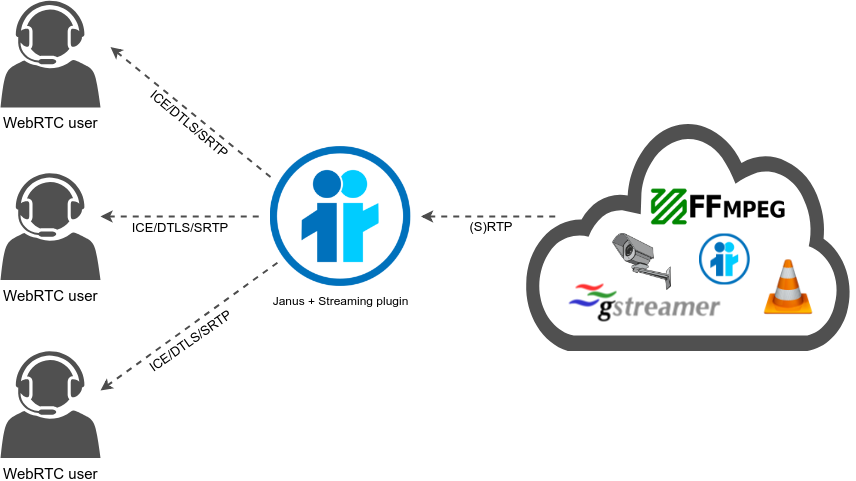
Long story short, it made a lot of sense to start here for the RoQ integration, and especially for the RoQ-to-WebRTC translation. In fact, RoQ still is RTP, after all, only transported in a different way. As such, why not allow the Streaming plugins to feed mountpoints not only from RTP/UDP, but also via RoQ?
We explained, in the previous section, how we baked in the core some APIs to create RoQ servers and clients, which meant that adding this RoQ functionality to the Streaming plugin mainly started from there: extend the mountpoint creation capability in order to conditionally use this new APIs for the purpose of creating a new RoQ server, when needed, and then hook the “incoming RTP packet via RoQ” callbacks to the Streaming plugin RTP-to-WebRTC broadcasting functionality.
Without delving too much into the details of how that was actually implemented, in a nutshell that is exactly what we ended up doing, with a little twist. Where for RTP/UDP each mountpoint is actually responsible for the listening socket (RTP packets hitting a specific socket only go to the mountpoint that “owns” the socket, and can’t be shared across different mountpoints), for RoQ we did something different, and basically decoupled the RoQ server functionality from the Streaming plugin mountpoint concept, rather than mapping them 1-to-1 as it may have been intuitive to do. The main reason for that was to add some flexibility to this, in order to allow different mountpoints to share some resources in some cases: in theory, this allows for a single RoQ server to feed all mountpoints, whether they’re interested to the same flows or not.
This means that, to test a RoQ-to-WebRTC session, the first thing we need to do is create a RoQ server within the context of the Streaming plugin. When we do this statically in the janus.plugin.streaming.jcfg configuration file it looks like this:
#
# In case you're interested in feeding mountpoints via RoQ, you need to
# create a RoQ server that mountpoints can refer to. These RoQ servers
# are created in the 'roq' category, indexed by their name and specifying
# IP/port to bind to, plus whether to use raw QUIC and/or WebTransport.
#
roq: {
	test-roq: {
		quic = true
		webtransport = true
		ip = "127.0.0.1"
		port = 9000
	}
}
A RoQ server can be created by adding an object to the roq container, which means that in this case we’re creating a new RoQ server called test-roq: we’re binding to port 9000, and enabling both raw QUIC and WebTransport (meaning RoQ clients can use both to connect).
Now, as it is this does nothing. RoQ clients can connect and send packets, but they’ll go nowhere until we also create a mountpoint to consume the data and do something with it. Let’s create one in the same configuration file:
roq-mountpoint: {
	type = "roq"
	id = 609
	roq = "test-roq"
	description = "RoQ test (1 audio, 1 video)"
	metadata = "This is an example of a RoQ mountpoint, using an audio and a video flow"
	media = (
		{
			type = "audio"
			mid = "a"
			label = "Audio stream"
			pt = 111
			codec = "opus"
			roqflow = 0
		},
		{
			type = "video"
			mid = "v"
			label = "Video stream"
			pt = 100
			codec = "vp8"
			roqflow = 1
		}
	)
	secret = "adminpwd"
}
For those familiar with the Janus Streaming plugin, this is basically the same way you typically create mountpoints, but with a couple of key differences. First of all, by specifying type = "roq" instead of, e.g., type = "rtp", we’re clarifying that this mountpoint will be fed by RoQ and not RTP or RTSP, which is what we’d typically do. We don’t specify any address or port either (as we don’t need to create RTP sockets), but only tell the plugin that we want to use a pre-created RoQ server as the source of our data, in this case the test-roq server we created before. We’re not done yet, though: we saw how RoQ can multiplex multiple streams on the same connection, which means we still need to create some mapping to ensure the right media goes on the right WebRTC stream. We do that by associating, for each of the media streams we add to the mountpoint (an audio and a video stream, in this case), which Flow ID will feed them: in this specific instance, we’re telling the plugin that each RTP packet from that RoQ server tagged with a Flow ID 0 will need to be relayed on the WebRTC side on the first (and only) audio stream, while Flow ID 1 will be mapped to the first (and only) video stream instead.
Simple as that! And, since RoQ server and mountpoint are decoupled, this means we can create more mountpoints that can refer to the same RoQ server, each choosing which Flow IDs to subscribe to (more mountpoints can choose to receive packets from the same Flow ID, if they want to) and how they’re mapped.
At this point, since this is integrated in the Streaming plugin, testing this becomes easy too. All we need to do is open the Streaming demo with a browser, and start subscribing to the RoQ-sourced mountpoint we just created. Obviously, nothing will come through until we start actually feeding the RoQ server with some RTP packets, so let’s do that too.
The simplest way to do that is by using the imquic-roq-client demo, from the imquic repo examples. This demo application can be configured to receive RTP coming from a different application (e.g., GStreamer) and encapsulate it via RoQ to be sent to a RoQ server. This is an example of how it can be launched:
./examples/imquic-roq-client -r 127.0.0.1 -R 9000 -q -w -a 15002 -A 0 -v 15004 -V 1 -m streams
In this example, we’re telling the RoQ client to connect to a server (-r 127.0.0.1 -R 9000), via either raw QUIC (-q) or WebSockets (-w). We then tell it we want to send both an audio and a video stream: for audio, we’ll be waiting for RTP packets on port 15002, and we’ll use 0 as a Flow ID on RoQ (-a 15002 -A 0); for video, we’ll be waiting for RTP packets on port 15004 instead, and use 1 as a Flow ID (-v 15004 -V 1). Finally, we tell the client we want each RTP packet to be sent on a different stream (-m streams).
As soon as we launch the RoQ client, a QUIC or WebTransport connection will be established with the RoQ server, but again nothing will happen until we start feeding the client with RTP packets to encapsulate and send, since the client won’t generate any of its own, but will expect a separate application to serve them on the RTP ports it’s listening on. Let’s use a GStreamer pipeline for the purpose:
gst-launch-1.0 \
	filesrc location="iron-maiden-audio.opus" ! \
		oggdemux ! queue ! \
		rtpopuspay ! udpsink host=127.0.0.1 port=15002 \
	filesrc location="iron-maiden-video.webm" ! \
		matroskademux ! queue ! \
		rtpvp8pay pt=110 ! udpsink host=127.0.0.1 port=15004
This will have GStreamer generate RTP traffic out of a couple of audio/video files, and send it to the ports the RoQ client is listening on. The RoQ client will receive the RTP packets, and route them via RoQ to the RoQ server, tagging them with the appropriate Flow ID. If everything works correctly, something like this should appear on the Janus logs:

This shows that the RoQ server we created via the Streaming plugin has received a connection from a RoQ client, and then new streams were detected by the Streaming plugin for one of its mountpoints. If we now open the Streaming plugin demo, and subscribe to the RoQ mountpoints, we should see something like this:

Eureka again! Habemus RTP!
Now, an interesting question might be: what would happen if we started our RoQ client with a -m datagram multiplexing flag instead? Well, if we tried that, very likely audio would work, while video would be extremely choppy, or not work at all. The reason for that is simple, as we explained that already: video frames will often be too large to fit a QUIC DATAGRAM frame, which means those RTP packets would never be sent, and so never reach the RoQ server, thus causing the WebRTC recipient to see gaps in sequence numbers that will look like lost packets that will never be recovered.
Now let’s see if we can get the other direction working too…
WebRTC-to-RoQ: leveraging RoQ forwarders
Just as we started from the Streaming plugin for the RoQ-to-WebRTC functionality, it made a lot of sense to start from the VideoRoom plugin instead for the other way around, that is WebRTC-to-RoQ gatewaying. In fact, as an SFU, the VideoRoom plugin basically is the go-to solution for all those Janus users that need injected WebRTC streams to be handled externally somehow. This is usually, and easily, done using the so-called RTP forwarders, which basically implement exactly what their name suggests: the VideoRoom plugin (and a few others) can be instructed to externally and conditionally relay/forward/route RTP packets that it’s receiving from a WebRTC source to a remote UDP address, which is something it can do since, although WebRTC itself encrypts data, encryption is terminated by the Janus core, meaning that plugins have access to the unencrypted RTP traffic (unless end-to-end encryption is used, of course).
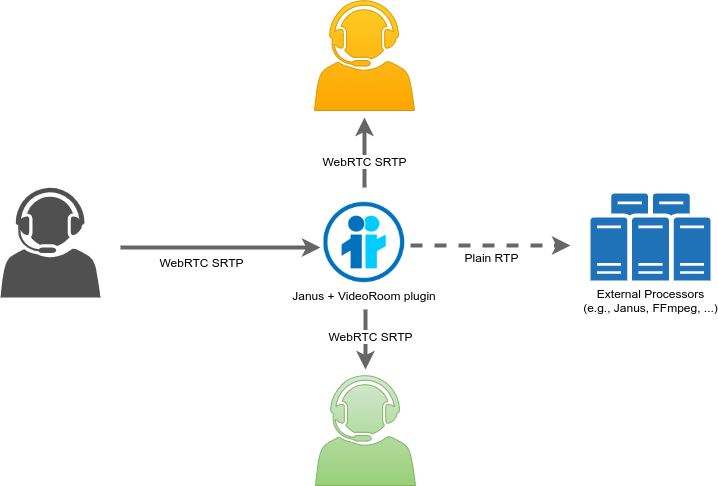
This functionality is really useful for a ton of different scenarios, since it makes WebRTC streams available to a whole plethora of tools and applications that may know nothing about WebRTC at all, but may understand what RTP is and how to process it. We use it extensively ourselves for scalability purposes, for instance (spreading the RTP load across multiple Janus instances), and for other features like live transcriptions, CDN re-broadcasting or other media processing. Others use it for many other scenarios too, like identity verification, external recording, and so on.
Long story short, the concept of RTP forwarding makes sense for RoQ as well, considering that RoQ is, again, still RTP. As such, that’s the way we went for this first integration of RoQ in Janus as well. In case we need WebRTC streams turned to RoQ, we can use “RoQ forwarders” for the purpose, where we can create a RoQ client when we need it, and then tag outgoing streams with different Flow IDs in order to multiplex more of them over the same RoQ connection.
If you recall the previous section, RoQ forwarders are indeed one of the features we baked in the core, which means that all we needed to do was integrate them in the VideoRoom and use them a bit like RTP forwarders. We ended up using a similar API as well, with a few key distinctions, though, namely in how we need to refer to a RoQ server address and Flow IDs, rather than route streams to separate UDP addresses/ports as we do for regular RTP forwarders. This will be clearer to understand in a later example.
In order to test this functionality, though, we need a recipient, that is a RoQ server that can receive our RoQ packets. Again, this is something we can use one of the imquic demos for, namely the imquic-roq-server sample application. Out of the box, this application simply waits for RoQ clients to connect and, for each RTP packet they receive via RoQ, it prints the content of the RTP header: nothing more, nothing less, so pretty basic, but still quite helpful to make sure we’re indeed getting what we expected. We can launch it like this:
./examples/imquic-roq-server -p 9443 -q -w -c ../localhost.crt -k ../localhost.key
We’re telling the RoQ server to bind to port 9443 (-p 9443) and to allow clients to connect either via raw QUIC or WebTransport (-q -w). Since we’re a server, we’re passing a certificate (-c) and private key (-k) as well.
At this point, our RoQ server is ready, and all we need to do is open the VideoRoom demo and configure a RoQ forwarder to reach it. Let’s start by publishing in a VideoRoom:

At this point, to start a RoQ forwarder we just need to send a request to the VideoRoom plugin, which to keep things simple we can do using the JavaScript console:
sfutest.send({message: {
	request: 'roq_forward',
	room: myroom,
	publisher_id: myid,
	secret: 'adminpwd',
	host: '127.0.0.1',
	port: 9443,
	quic: true,
	webtransport: true,
	streams: [
		{ mid: '0', flow_id: 0 },
		{ mid: '1', flow_id: 1 }
	]
}});
The message should be relatively straightforward to understand: instead of rtp_forward, we’re sending a roq_forward request, to clarify our intention of using RoQ forwarders. We specify which user we want to create the forwarder for (by passing the room and publisher_id), and then provide the address of the RoQ server (host and port match the RoQ server we just launched), which we can connect via either raw QUIC or WebTransport (whatever works). Finally, we provide the list of streams we want to forward via RoQ, as an array: each object identifies a specific WebRTC stream (via their mid) and how they should be tagged on RoQ (flow_id). There’s more we could do here, like rewriting payload type or SSRC, but let’s keep things simple and see what happens now.
As soon as we send the request, the plugin will first of all check if, for this specific publisher, a RoQ client connected to that specific RoQ server exists already: this is to ensure that, if we send a new request later to forward more streams, we can re-use the connection rather than create a new and separate one. If it doesn’t, we create one from scratch. Then, we configure the forwarder with the new Flow IDs and some mapping information, and then update the publisher streams in the VideoRoom so that routing can happen internally any time an RTP packet comes in.
The end result can be seen in the screenshot below, which shows our RoQ server printing some information about all RTP packets it’s receiving:

We see packets associated to different Flow IDs (0 and 1), which means our VideoRoom instance is indeed forwarding packets associated to both streams, as we asked. The RTP headers all look correct too, which means it looks like we’re getting the right thing.
Another interesting piece of information we can see is related to multiplexing. As you can seen, packets with Flow ID 0 are apparently coming in via DATAGRAM frames, while packets with Flow D 1 via STREAM instead. This is because we intentionally configured RoQ forwarders in Janus to automatically use DATAGRAM for audio packets (which are smaller), and STREAM for video instead. In the future, it may make sense to make this configurable via API as well, but for now it made sense to test both that way.
WebRTC-to-RoQ-to-WebRTC!
Ok, we can do RoQ-to-WebRTC, and we can do WebRTC-to-RoQ, but what if we wanted to go full circle now, and do WebRTC-to-RoQ-to-WebRTC? This would allow us to test that RoQ trunking functionality we mentioned earlier as an interesting use case, where at the edges we’re using a specific technology (i.e., WebRTC, in this case), but we’re bridging it via another one (RoQ).
There’s a simple way to test that, and it is by combining the two different scenarios we’ve seen so far. That is, why spawn a separate RoQ server for our VideoRoom RoQ forwarder, when we have a RoQ server active in the Streaming plugin already? Let’s do exactly that, and on the same VideoRoom page we were testing in the previous section, by issuing a new roq_forward request aimed at a different RoQ server, that is our test-roq server living in the Streaming plugin:
sfutest.send({message: {
	request: 'roq_forward',
	room: myroom,
	publisher_id: myid,
	secret: 'adminpwd',
	host: '127.0.0.1',
	port: 9000,
	quic: true,
	webtransport: true,
	streams: [
		{ mid: '0', flow_id: 0 },
		{ mid: '1', flow_id: 1 }
	]
}});
Just as with RTP forwarders, we can definitely spawn multiple RoQ forwarders for the same publisher (and their streams) at the same time, which means we’ll now forward those same RTP streams to two different RoQ servers concurrently.
Considering we’re now feeding the Streaming plugin RoQ server from the VideoRoom, rather than from the sample GStreamer pipeline we showcased before, when we open the Streaming plugin demo we should something like this instead (your test will probably not include my gorgeous cat, though):

Eureka yet again, that worked too!
And, considering RoQ forwarders are a dynamic feature, we can always stop some streams at any time, when we don’t need them (they’ll be automatically destroyed when the publisher leaves):
sfutest.send({message: {
	request: 'stop_roq_forward',
	room: myroom,
	publisher_id: myid,
	secret: 'adminpwd',
	host: '127.0.0.1',
	port: 9443,
	flow_id: 1
}});
Time for you to play with that, now!
Hey, I see a janus_moq.c too!
You’ve got a sharp eye! Yes, as I anticipated in the abstract, the branch does contain some MoQ related code too. Specifically, it introduces a new plugin, janus_moq.c, which is meant to provide an easy way to test a WebRTC/MoQ integration of sorts, by allowing you to use a WebRTC PeerConnection to either create a MoQ publisher (and so send WebRTC audio/video to publish via MoQ) or a MoQ subscriber (and so get audio/video via MoQ, and then receive it via WebRTC). This is more or less the same code that fueled the demo I talked about in the MoQ blog post, some time ago, even though with several changes and enhancements.
The main reason why I haven’t talked about it in detail yet, though, is that at the moment it can’t really be used anymore, and will need some changes before it’s usable again. In fact, in order to test it with a MoQ endpoint that can act both as a publisher and a subscriber, I based the integration on what moq-encoder-player uses to exchange media, which mostly means adhering to their flavour of the Low Overhead Media Container (think of it as an “RTP for MoQ” of sorts). It also means being able to talk the same MoQT version, though, and that’s where things are currently broken: it worked great up until a few months ago, but it now looks like moq-encoder-player is still stuck at v14 of the MoQT specification, while imquic has recently dropped support for any version older than v16 (at the time of writing, the latest draft is v17, and changed the protocol quite a lot). As such, before I can move further on with these tests, a few things may need to happen:
- either I wait for
moq-encoder-playerto support v16/v17 of MoQT as well, or - I start writing some MoQ publisher/subscriber demos of my own that can encode/decode audio and video, with proper LOC support too.
The latter is definitely on my TODO list, sooner or later (whether in the browser, e.g., via WebTransport and WebCodecs, or as command-line demos based on imquic), but the former would ensure there is some form of interop with a third-party application, rather than a closed loop of my own code talking to itself. As work on the LOC specification progresses, hopefully more implementations will start popping up as well, which may make this sort of interop easier to perform.
What’s next?
Well, this first round of QUIC integration in Janus is out in the open, now, which means the ball is in your court too. Is this something that tickles your interest? Then by all means start tinkering with the demos I showed, and try doing some clever things with the existing code!
That said, there still is a lot that needs to be done:
- The WebTransport plugin for the Janus API is basically more of a toy, now, but what if it could become something more than that? Would it make sense to integrate the client side of it in
janus.js, for some more testing? - The RoQ code works fine for a few demos, but in time it will need some strengthening, so that it becomes more robust. There’s no simple way to get rid of RoQ resources, for instance, and we may need more ways to dynamically handle them. Besides, how should be handle disconnections, should they happen? Should a reconnection attempt happen automatically, or should that trunk be marked invalid, and the application notified somehow? Will congestion control play a role, once we try to shove more RTP packets than we can on a connection? How do we react to that, and do we have the right APIs (in Janus, but most importantly in imquic)? And that’s not to mention more use cases that may come up in the future, that may or may not force us to revisit, and possibly refactor, the way we organized the RoQ code so far. People experimenting with this will definitely provide useful feedback on the matter.
- It might also be cool to start testing RoQ as part of some interesting use case. Its trunking capabilities, for instance, might prove useful to our WebRTC CDN, as an alternative way to distribute published streams internally, from WebRTC ingestion to WebRTC distribution. Think WHIP and WHEP with a RoQ trunk! Maybe a demo of that could come next?
- Last but not least, we definitely need to improve the MoQ code too. I mentioned how there is a custom new plugin for the purpose and how it can’t really be used for much, at the moment, but more in general we’ll need some way to better present the results when the time will come: we’re lacking decent demo pages for that, for instance. Or should we follow the same approach we used for RoQ, and come up with a MoQ server (subscriber) and forwarder (publisher) concept for an easier integration into the existing Janus workfows, and possibly a more straightforward mapping to WHIP/WHEP too? Time will tell what makes the most sense.
Long story short, exciting times are coming, so we’ll definitely not be bored!
That’s all, folks!
I hope you enjoyed this practical overview of what, while mostly only a cool demo for now, may or may not become staples in future versions of Janus. Whether you’re a fan of QUIC or not, real-time media on QUIC is definitely coming, and so it’s a good idea to at least familiarize with what that might entail. If you have feedback on the blog post or ideas on what you’d like to do with WebRTC and QUIC, please don’t hesitate to let us know!


